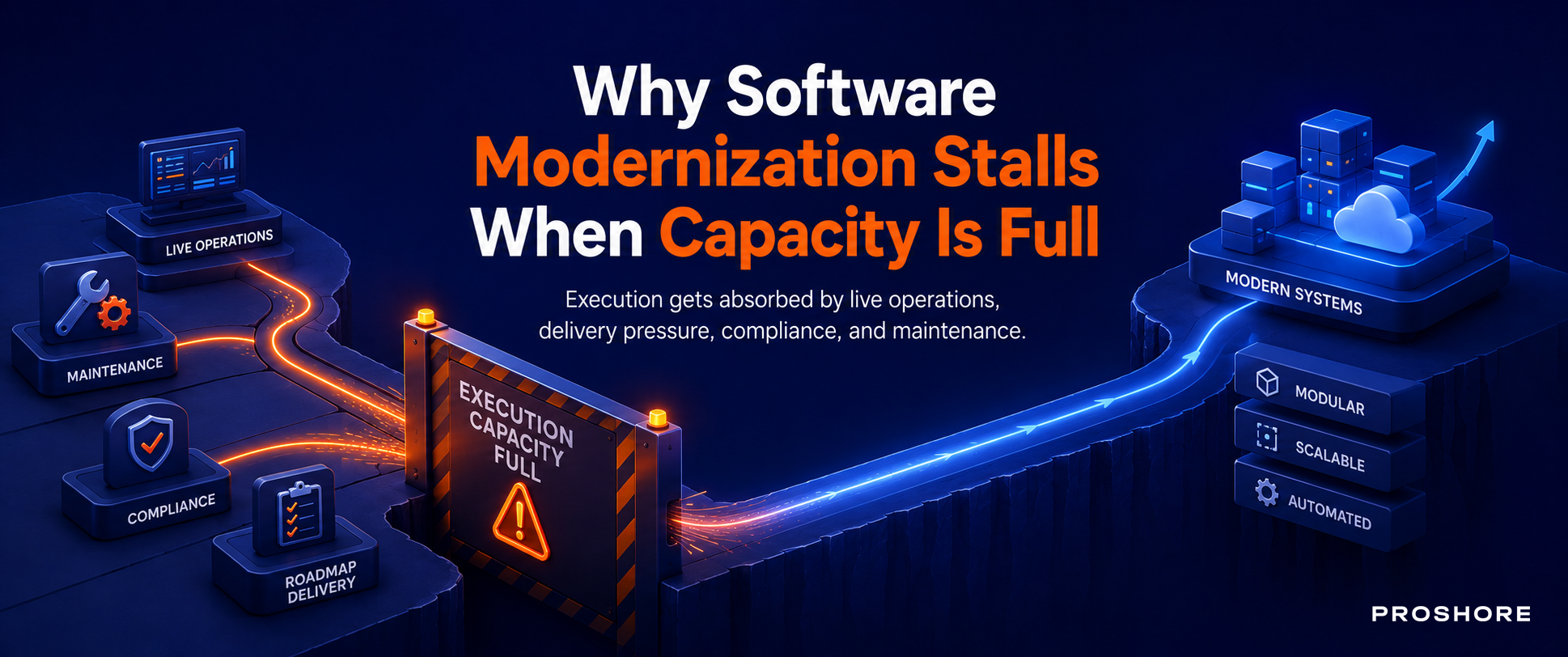
Most organizations do not struggle to identify what requires modernization. They struggle to execute it without disrupting core systems and ongoing operations.
Deloitte’s 2026 Global Technology Leadership Study estimates that technical debt consumes 21 to 40 % of IT spending and that a majority of legacy modernization initiatives fail or underdeliver.
This reinforces the cost and execution risk associated with large-scale change.
The need for modernization is clear, yet execution remains constrained by existing systems and operational risk.
The limitation lies not in vision or technology but in the ability to deliver change within live enterprise environments without compromising stability or continuity.
These challenges typically show up in the following patterns:
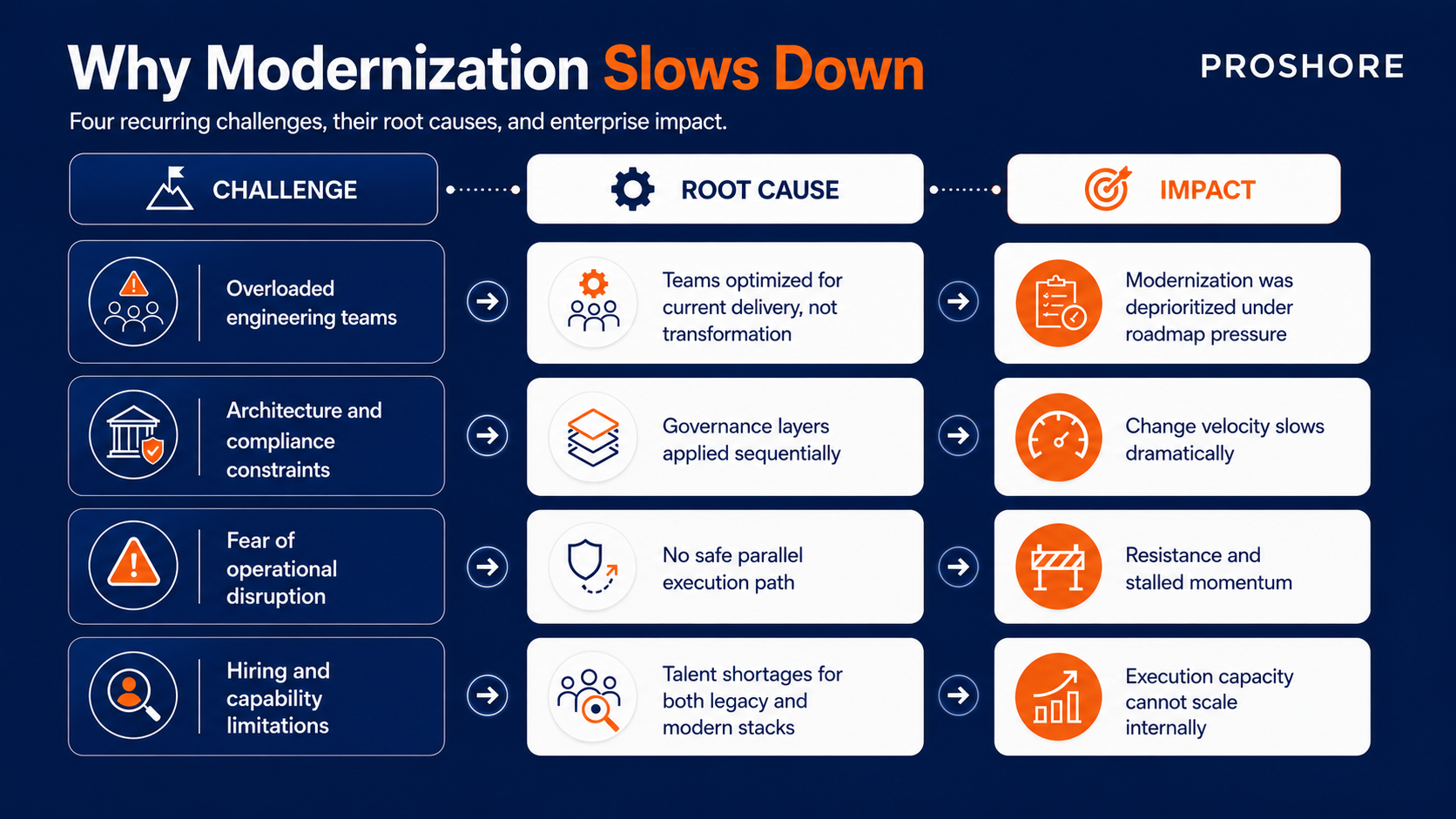
(Based on Saritasa Legacy Software Modernization Survey 2025 and Deloitte 2026 Global Technology Leadership Study)
The Real Constraint: Execution Capacity
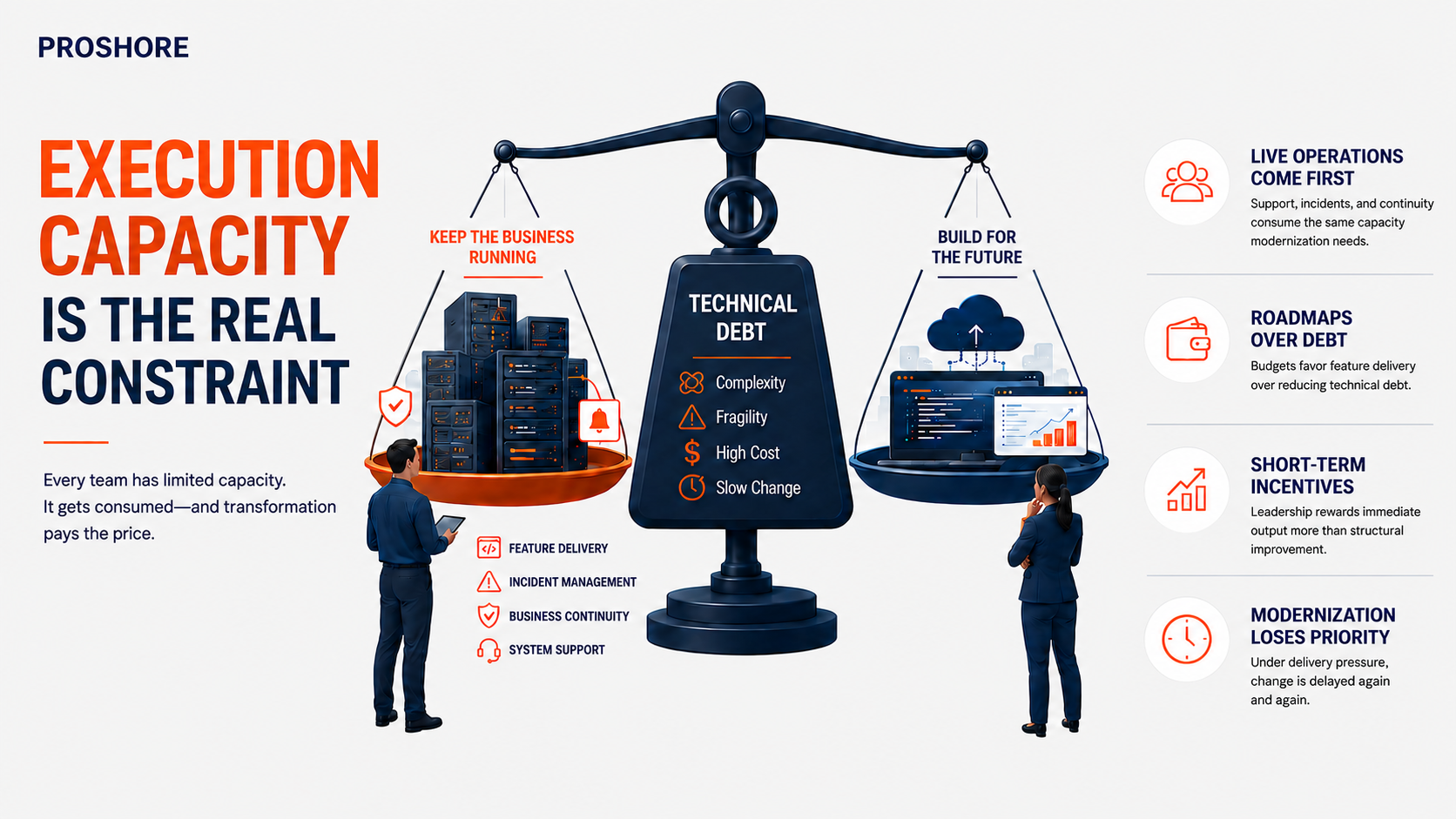
Modernization requires dedicated capacity and structured sequencing. It must be executed alongside live operations and ongoing system support.
Teams are organized and incentivized for delivery continuity rather than structural evolution. Budgets prioritize roadmap commitments over reducing technical debt.
Leadership incentives emphasize short-term output over long-term system improvement.
This creates a resource-allocation trade-off in which modernization competes with feature delivery, incident management, and business continuity. It consistently loses priority under delivery pressure.
This reflects a systems design failure where execution capacity is not established as a continuous capability alongside live operations.
Why Full System Replacement Often Fails
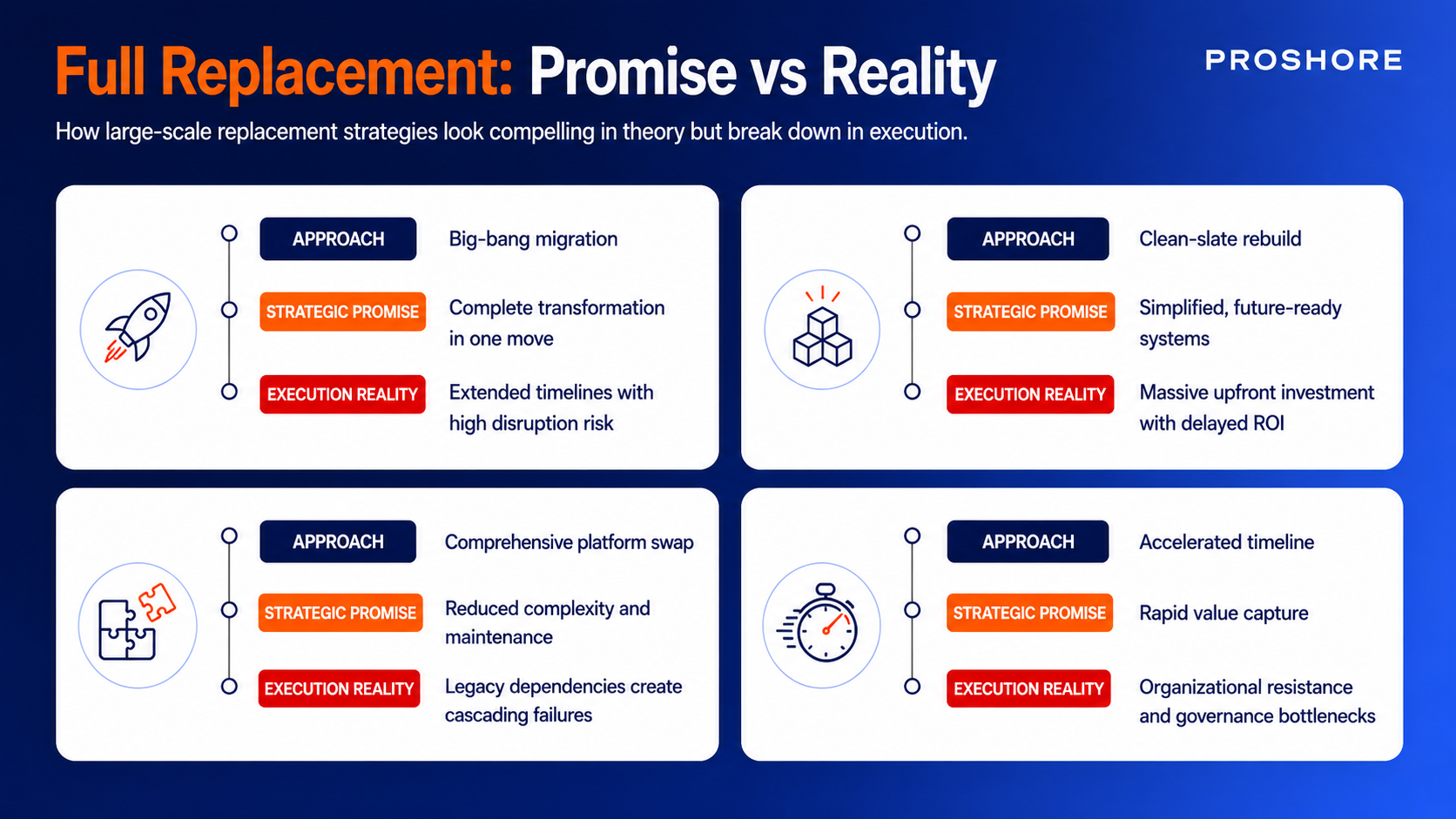
Full system replacement is attractive at the strategy level. It promises a clean slate and a future-ready architecture with simplified operations.
In execution, it introduces long delivery timelines, high operational risk, delayed value realization, and large upfront investment.
It also creates significant organizational resistance.
These programs assume uninterrupted focus, sustained capacity, and tolerance for disruption that do not exist in live enterprise environments.
Strategic intent collides with operational feasibility. Most full replacements stall because the delivery model cannot sustain execution alongside day-to-day operations.
A Lower-Risk Modernization Model
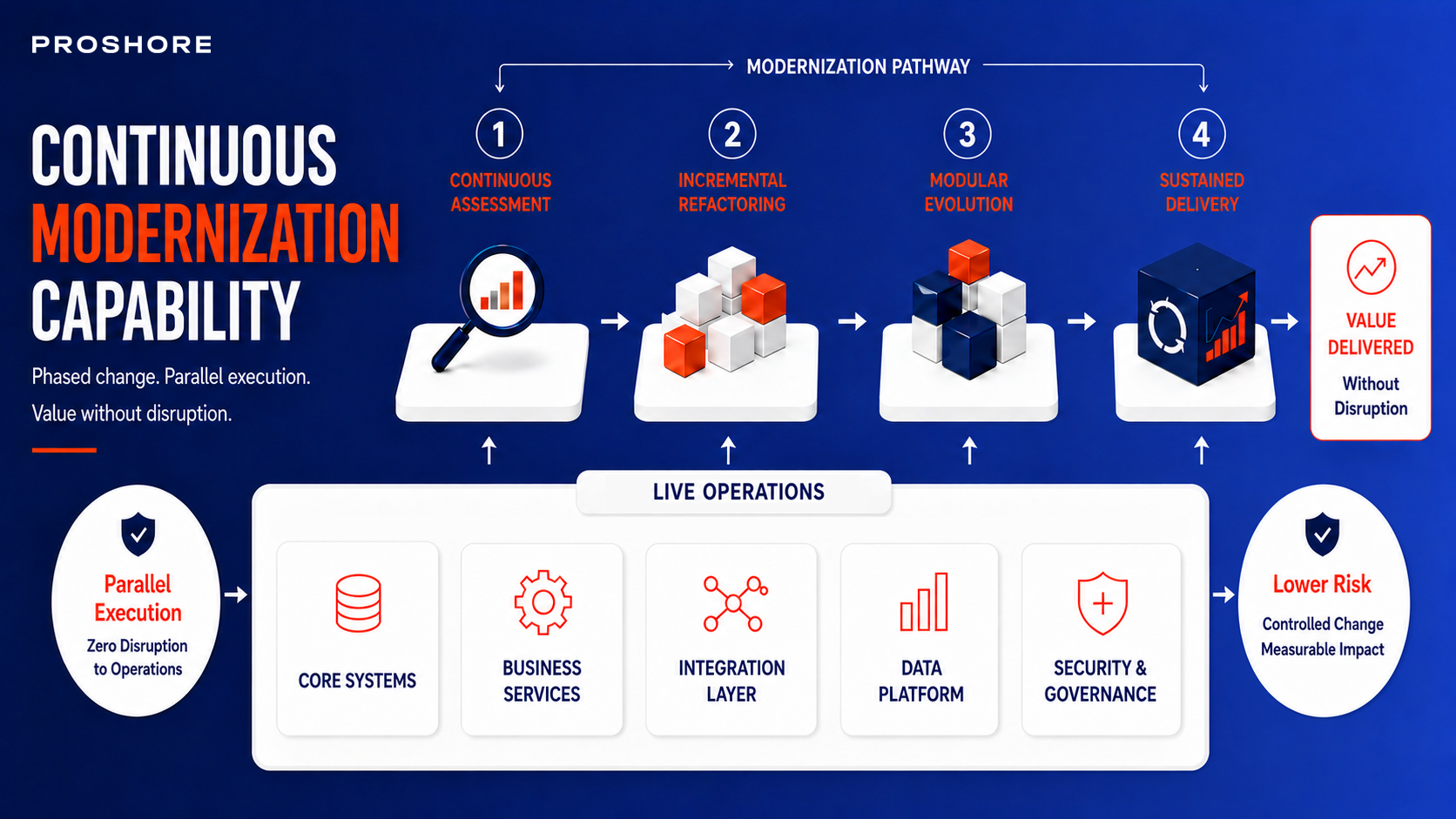
Modernization succeeds when it is treated as a continuous capability within the delivery system.
It runs in parallel with live operations through phased assessment and incremental refactoring. Modular architecture evolves over time with dedicated execution support.
Continuous assessment identifies priorities. Incremental refactoring delivers value without disruption.
Modular evolution reduces system dependencies over time. This approach converts technical debt into a structured backlog.
It enables controlled system evolution and sustained delivery progress.
Evaluating Modernization Within Enterprise Constraints
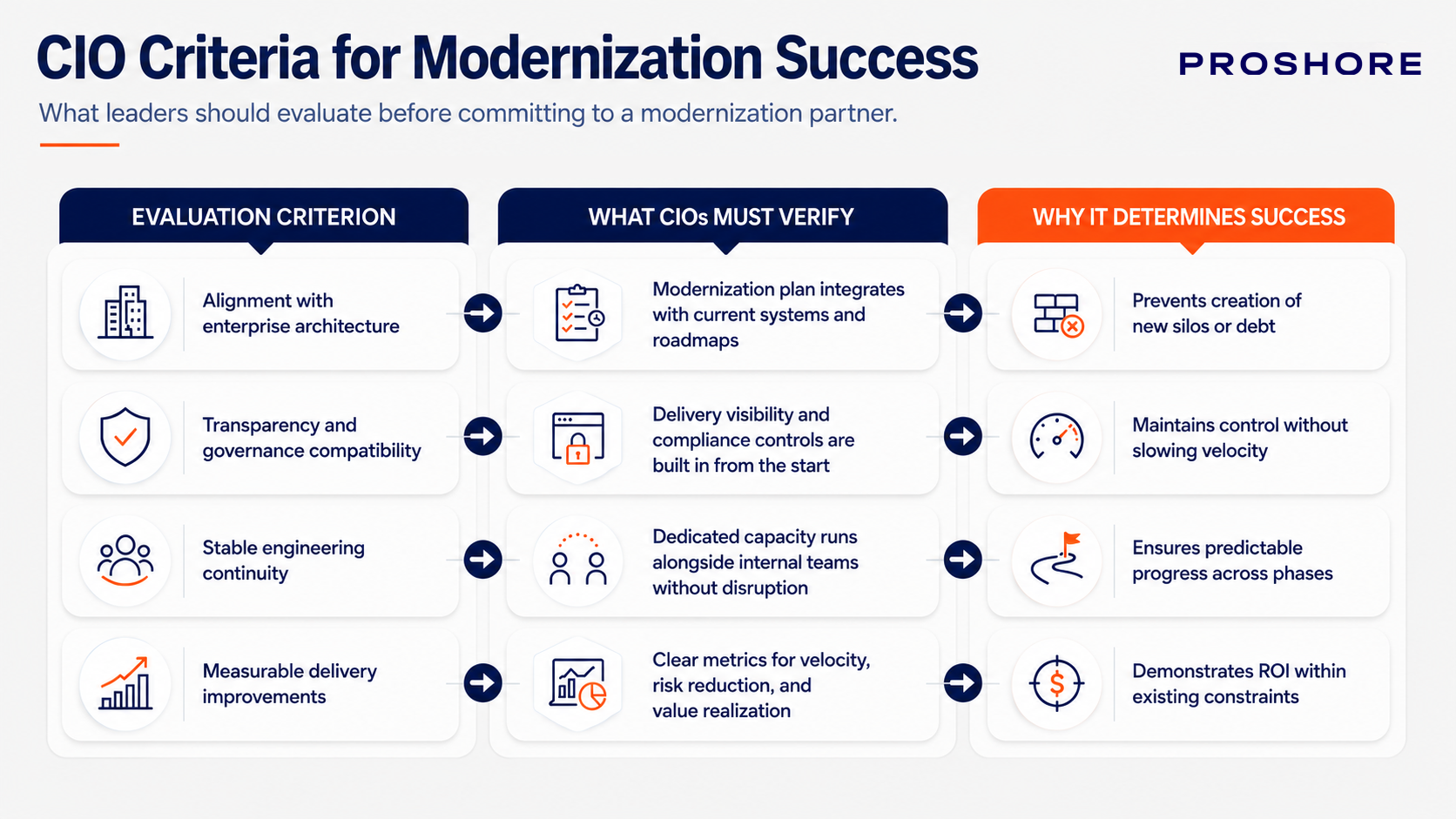
CIOs are not selecting technology in isolation. They are selecting execution initiatives that align with governance structures. These models must sustain operational continuity and deliver measurable improvement within the broader roadmap.
The central question then often shifts from “Is this the right architecture?” to “Can this modernization approach align with our governance realities and execution capacity?”
Proshore as an Execution Layer for Continuous Modernization

Proshore supports internal teams by providing dedicated modernization capacity that does not compete with roadmap delivery.
It operates within existing governance structures and delivery systems as an embedded execution layer.
This approach enables incremental modernization while maintaining operational continuity and delivery stability.
Organizations modernize without disrupting core operations. Systems evolve while business commitments continue. Progress is delivered in controlled increments with predictable outcomes.
Since 2018, Proshore has supported De Hues in modernizing operations by replacing spreadsheet-driven workflows with scalable cloud-based systems integrated across business units, improving operational visibility and reducing manual dependency.
Proshore also modernized SiteGuru by transitioning a monolithic application to a microservices architecture, increasing system flexibility and enabling continuous delivery without service disruption.
Conclusion
Modernization breaks down under delivery pressure as capacity shifts to live operations, and systems resist parallel change.
This forces a trade-off. Feature delivery is often prioritized over stability, and incident response and modernization are delayed or fragmented.
Sustained modernization requires a different execution model. Capacity must be allocated alongside ongoing delivery. System change must be incremental and integrated into existing workflows.
Organizations that achieve this do not rely on large-scale programs. They modernize through controlled increments that maintain stability and improve systems over time.
As execution becomes consistent, change becomes manageable, and outcomes become more visible.




by Roshan Bhattarai Co-Founder & Operations Director, Proshore

Remote Development
TypeScript for Startups: Building a Solid Foundation for the Future
Tired of battling bugs and debugging endless lines of JavaScript? Ready to level up your startup's tech stack? Dive into the world of TypeScript and discover how it can revolutionize your development process.
Book a call Talk to our Accounts director, Jeroen, to see if our ready-to-code offshore teams are a fit for you.
As a tech company founder, I know firsthand how chaotic and exhilarating it is to build a tech startup. Although I started 15 years ago – the pressure to move fast, the constant pivots, and the endless to-do list can be overwhelming. Amidst all the hustle, investing in building a solid foundation for your tech stack becomes crucial. That's where TypeScript comes in.
In recent years, TypeScript has emerged as a powerful tool that can address many challenges tech companies face in building complex web applications. In this blog post, we'll discuss TypeScript – highlighting its key benefits, potential drawbacks, and how it can specifically impact startups.
Why TypeScript Matters for Startups
Startups operate in a dynamic environment where speed and agility are crucial. We need to be able to move quickly to validate ideas, build prototypes, and iterate on our products. However, this rapid development pace can often come at the expense of code quality. Traditional JavaScript, while versatile, can be prone to errors due to its loose typing. This can lead to bugs that are difficult to detect and fix, ultimately slowing down development and impacting the user experience.
TypeScript offers a compelling solution to this problem. By adding static typing to JavaScript, TypeScript helps to catch errors early in the development process, before they can cause major issues. Hence TypeScript over JavaScript can significantly improve code quality, reduce debugging time, and make your codebase more maintainable in the long run.
Here's a breakdown of why TypeScript is a game-changer for startups:
1. Catch Errors Early:
Type Safety
TypeScript forces you to define the types of your variables, functions, and objects. This might seem like overkill at first, but it pays off big time. You'll catch potential errors during development, saving you countless hours of debugging later.
Improved Code Quality
With TypeScript, you'll write cleaner, more maintainable code. Your team will thank you when they're not scratching their heads trying to figure out why a function is behaving unexpectedly.
2. Enhanced Developer Productivity:
IntelliSense
Your IDE becomes a superpowered code assistant. It suggests code completions, highlights potential issues, and auto-generates boilerplate code.
Faster Development
By catching errors early, you'll spend less time debugging and more time building new features.
3. Scalability and Maintainability:
Long-Term Vision
As your startup grows, your codebase will become more complex. TypeScript helps you manage this complexity by providing a strong type system that ensures consistency and prevents unintended side effects.
Easier Onboarding
New developers can quickly get up to speed with your codebase thanks to TypeScript's clear type annotations and documentation.
Get a detailed breakdown of all the benefits of TypeScript Development in our past blog by my colleague and JS Dev, Atul Shrestha.
Potential Drawbacks of TypeScript
While TypeScript offers a number of advantages, it's important to be aware of some potential drawbacks as well:
1
Learning Curve
TypeScript introduces a new layer of complexity to JavaScript development. If your developers are not familiar with static typing will need to invest some time in learning the TypeScript syntax and best practices.
2
Potential for Boilerplate
In some cases, TypeScript can lead to an increase in boilerplate code, especially for simple projects. It’s important to strike a balance between the benefits of static typing and the need to write concise code.
3
Tooling Integration
While TypeScript leverages existing JavaScript tooling, there may be some initial setup required to integrate it into your team’s development workflow.
1
Learning Curve
TypeScript introduces a new layer of complexity to JavaScript development. If your developers are not familiar with static typing will need to invest some time in learning the TypeScript syntax and best practices.
2
Potential for Boilerplate
In some cases, TypeScript can lead to an increase in boilerplate code, especially for simple projects. It's important to strike a balance between the benefits of static typing and the need to write concise code.
3
Tooling Integration
While TypeScript leverages existing JavaScript tooling, there may be some initial setup required to integrate it into your team’s development workflow.
Is TypeScript Right for Your Startup?
The decision of whether or not to adopt TypeScript will depend on the specific needs of your startup. Here are some factors to consider:
1
The size and complexity of your codebase
If you’re working on a small, relatively simple project, the benefits of TypeScript may be outweighed by the learning curve. However, as your codebase grows and becomes more complex, TypeScript can become a valuable asset.
2
The experience of your development team
If your team is already familiar with statically typed languages, the transition to TypeScript will be smoother. However, even if your team is primarily experienced with JavaScript, the benefits of TypeScript can outweigh the initial learning curve.
3
Your project's long-term goals
If you’re building a product that you expect to scale significantly in the future, TypeScript can be a wise investment. The upfront time spent learning TypeScript will pay off in the long run as your codebase becomes more complex.
1
The size and complexity of your codebase
If you're working on a small, relatively simple project, the benefits of TypeScript may be outweighed by the learning curve. However, as your codebase grows and becomes more complex, TypeScript can become a valuable asset.
2
The experience of your development team
If your team is already familiar with statically typed languages, the transition to TypeScript will be smoother. However, even if your team is primarily experienced with JavaScript, the benefits of TypeScript can outweigh the initial learning curve.
3
Your project's long-term goals
If you're building a product that you expect to scale significantly in the future, TypeScript can be a wise investment. The upfront time spent learning TypeScript will pay off in the long run as your codebase becomes more complex.
Build a strong codebase with TypeScript
While TypeScript might require an initial learning curve, the long-term benefits are substantial. By investing in TypeScript, you're not just writing code; you're building a solid foundation for your startup's future. So, take the leap, embrace TypeScript, and watch your productivity soar!
If this blog has made you convinced to adopt TypeScript for your tech startup, here are some practical tips:
Start Small
Introduce TypeScript gradually to your existing projects. Begin with small, self-contained modules and gradually migrate larger parts of your codebase
Leverage Strong Tooling
Use a modern IDE like Visual Studio Code with TypeScript extensions. It'll provide you with powerful features like code completion, refactoring, and debugging.
Embrace the Community
The TypeScript community is vibrant and supportive. Don't hesitate to ask questions on forums like Stack Overflow or join online communities.
Don't Be Afraid to Experiment
TypeScript is a flexible tool. You can customize it to fit your team's preferences and project requirements.
If you are looking to hire a TypeScript Development team that is ready-to-code and scalable as per your budget – book a call with us to explore our remote experts from Nepal.


Software companies have two options for the architecture of Software as a Service (SaaS) applications: single-tenant and multi-tenant. There are pros and cons to each type of architecture, and choosing the right one depends on the business case.
Why choose Laravel for multi-tenant SaaS development?
There are many backend PHP frameworks to choose from – including CakePHP, Symfony, and Drupal – but what sets Larvel apart is its strong developer community.
Reach out for help to Laravel communities on LinkedIn and other platforms, and you’re certain to get the response you need. It’s also well-documented, with clearly explained tutorials and resources that make it easy for developers to pick up and learn. It’s a developer-friendly framework.
When it comes to multi-tenant SaaS development, Laravel offers many advantages that make it an ideal choice for building scalable and maintainable applications. From a development perspective, it’s robust and well-managed, providing a strong and reliable platform on which to build.
Here at Proshore, we have over 15 years of experience in PHP, and, over the last 9 years or so, we’ve developed our very own community of Laravel experts.
What is multi-tenant architecture?
Multi-tenant architecture for SaaS is where a single software serves multiple customers or ‘tenants’. Each tenant has their own isolated and secure environment within the application, with their own data, configurations, and user access rights. This includes:
- Separate Databases
- Remote storage buckets
- API tokens
- Subdomains
Product Owners can sell the same SaaS products to different customers, tailoring the product to specific business needs. This model contrasts with single-tenant applications, where each customer has their own dedicated instance of the software.
Laravel is a highly popular, open-source PHP framework for web apps that supports multi-tenant architecture. Its library of packages means developers don’t have to keep reinventing the wheel every time they build a new web app.
What are the benefits of Laravel for SaaS?
Building multi-tenant architecture inside Laravel gives both developers and the software companies they serve many strategic advantages. Here are 11 benefits:
The technical benefits of multi-tenant architecture
Multi-tenant architecture has many technical features that are advantageous to Product Owners, development teams, and every stakeholder of a SaaS product.
Data Transfer Object (DTO)
DTO enables data transfer between different subsystems or layers in a software application. That means reusable functions – such as email or SMS notifications – can be updated and reused across multiple tenants.
Mixins and stores
Mixins and stores serve different purposes in multi-tenant architecture. In different ways, they help reduce code duplication and facilitate optimization to improve code quality:
- Mixins relate to code reuse within different components. They provide a mechanism for combining reusable functionality from different classes.
- Stores provide a centralized solution for managing the application’s state and facilitating communication between components.
Event-Driven Development (EDD)
In a multi-tenant SaaS app environment, EDD can be employed to handle various asynchronous events, such as notifications, updates, or data changes.
Events can be used to signal changes and actions in tenant-specific data, triggering updates or notifications for relevant tenants. This makes it much easier to automate and handle dependent actions for multiple tenants within an app.
Extraction of classes based on criteria
In object-oriented programming, when you extract classes based on certain criteria you are able to improve the organization, modularity, and maintainability of your code.
This process involves identifying components in your code that have a specific responsibility or meet certain criteria, and then creating separate classes to encapsulate those responsibilities.
Frontend routes based on roles and modules
Roles and permissions are used to create separate access routes for different user levels so that users only see what they’re supposed to see.
Frontend routes based on modules ensure everything relating to a single entity – either the tenant or a specific role – is in one place.
Looking for specific Laravel services? Proshore can help
Tell us more about your project requirements and receive customized recommendations via email or over a 15-minute consultation call.
Contact us
Implementing Laravel for data privacy and data separation
A Proshore client expressed a preference for data separation with strict data privacy requirements. To fulfill this request, we leveraged Laravel’s tenancy feature, specifically utilizing its multiple database functionality. This approach allowed us to meet the client’s need for distinct data sets while accommodating their preference for data separation over stringent data privacy measures.
As our system expanded, we encountered challenges in managing routes. To address this issue, we adopted a more organized approach by creating separate files for each role’s middleware routes. This strategic separation not only facilitated more efficient code management but also streamlined the handling of routes associated with different roles.
The implementation of the repository and service pattern has significantly improved our code management. This structured approach has streamlined our development process, making it more agile and efficient. Adding new features or making modifications has become a smoother experience, as adjustments are confined to the repository and service patterns.
This not only saves time but also enhances our ability to test both manually and through Test-Driven Development (TDD) practices. The systematic organization of our codebase ensures that changes can be implemented with minimal disruption, contributing to the overall maintainability and scalability of our system.
PHP expertise from Proshore
Here at Proshore, we have thousands of highly-skilled, ready-to-code developers with expertise in multiple front-end and back-end programming languages, including Laravel.
Whatever expertise you’re looking for, we can assemble the right team for your needs – either to augment your existing dev team or provide a dedicated team of IT professionals.
We’re also dedicated to using the best technology – like Laravel – to get the job done. Here are some of the other tools and external packages we use for developing multi-tenant architecture using Laravel:
- Tenancy For Laravel
- Role and Permission
- AWS Cloudwatch
- Maatwebsite
- Signhost
- ConvertAPI
Discover how much you could save by hiring Laravel developers from Proshore without compromising on quality. Book a call with our Accounts Director for a free consultation and a customized quotation.

Creating modern websites or web applications is not a straightforward process – it is a complex process encompassing various stages from web design, frontend development, and backend development to database management. A technology language helps give the web development process a structured approach, pre-built components, and tools necessary to efficiently create dynamic, interactive, and scalable web applications.
Tech languages and frameworks offer various functionalities such as user authentication, data processing, form validation, real-time updates, and optimization features, ensuring the longevity, performance, and security of a web development project.
Hence, to create seamless digital experiences that help establish a business’s online presence, where they can interact with audiences and deliver value, choosing the right technology for web development is paramount to the success of the project.
Why choose Laravel for Web Development?
Laravel isn’t just a powerful PHP framework; it is a game-changer in the world of web development. It emerges as a preferred choice for developing web apps as it provides the following benefits over other tech frameworks,
Laravel’s combination of features along with a widely supportive community makes it a powerful and versatile framework for developing modern web applications. Its emphasis on developer productivity, code quality, and maintainability sets it apart as a preferred choice for web development projects.
Laravel Web Development Services
Laravel offers a wide range of web development services catering to diverse business needs. Some key Laravel web development services are;
At Proshore, we specialize in leveraging Laravel’s capabilities to create dynamic and feature-rich web solutions tailored to unique business needs. From intuitive user interfaces to seamless backend functionality, our Laravel web development services are designed to propel businesses forward.
Why Proshore for Laravel Web Development?
With 9+ years in Laravel, choosing Proshore means choosing excellence in Laravel web development. We offer all the aforementioned Laravel web development services and specialize in crafting customized Laravel web solutions that realize business ideas and bring products to life.
Our team of seasoned developers combines technical expertise with creative vision to deliver solutions that exceed expectations by leveraging the full potential of Laravel. Through the scalable and high-performing PHP framework, we also ensure that the product can be scaled up as the business grows and that it can be easily enhanced as the market changes.
Our Laravel Web Development process
Using an agile approach, we onboard our clients along with a 60-day trial period. Starting with a consultation call, we provide a customized plan on the best approach to a Laravel web development project.
With a talent pool of 4k+ developers with varying experience and expertise that match the project’s requirements and product stage, a client can start their Laravel web development project with Proshore through two options,
1. Start with a single self-managed Laravel Web Dev
2. Hire a dedicated Laravel Web Development team
Start with a single self-managed Laravel Web Dev
Require a Laravel expert for a specific project? Or a seasoned professional who can aid in an ongoing development runway? Proshore’s Laravel web developers are ready-to-code and come with the experience required by the project.
Proshore vs. Freelancers
While freelancers can be hired to tackle the problems instead of our self-managed Laravel Web Developer, hiring from a web development company like Proshore can provide a more rounded solution. The advantages are
Hire a dedicated Laravel Web Development team
Do you require a dedicated team to focus on enhancement projects? Or are you looking for a well-rounded team to develop a business idea from scratch? Proshore’s dedicated Laravel web development team can take your product to the next level.
Proshore vs In-house hiring
There are several distinct benefits of hiring Proshore as a Laravel development company as opposed to building an in-house team for Laravel web development.
Partnering with Proshore for Laravel web development as opposed to hiring freelancers or in-house provides many benefits. You will find that we are not only focused on the task at hand but also forward-thinking to grow synergistically as long-term partners.

An offshore software development team is a group of software developers and IT professionals who work outside their client’s home country. Companies usually hire offshore teams to work on specific projects, tasks, or ongoing support and maintenance activities.
An offshore team works exclusively for one client. Because they don’t work for multiple clients at the same time, they can focus their attention and commit to one client’s needs. On top of that, their client gains all the usual benefits associated with hiring offshore software development teams.
Offshore teams are often engaged in long-term projects. They become an extension of your in-house team and work closely with you to meet project goals and objectives. If that sounds like something you could benefit from, here’s what you need to know about hiring an offshore team.
Why consider an offshore software dev team?
There are many reasons to choose an offshore development team. Here are some of the main reasons to take this approach to software development:
How do you set up an offshore software dev team?
At Proshore, we take a 3-phase approach to setting up your offshore team. Here’s how it works:
Book a discovery call with Jeroen, our Co-Founder
Spend 15 minutes with our Co-Founder and outsourcing expert, sharing about your business and goals.
Get a customized plan that addresses your challenges
Jeroen and the team analyse your challenges to come up with a customized plan and proposal based on what you need.
Meet your new team
Your plan covers setting up team roles and tasks. Babish, our CTO, assembles the best team available from our talent pool and shares it with you for approval.
2-month trial period
Test your team’s output during a 60-day trial period. Not happy with someone? We work with you to replace them at no extra cost.
Expand or scale down
Add new talent to your team or scale down based on your goals and roadmap. No recruiting, hiring or HR paperwork.
Best practices for collaborating with an offshore software development team
For a number of reasons – including different time zones, language barriers, and cultural differences – collaborating with an offshore team can be challenging.
Here’s a table of best practices and advice for getting collaboration right:
The challenges of working with offshore software development teams
There are challenges with any type of offshore software development. These also apply to hiring offshore software development teams.
Here are some common issues to consider:
- Communication barriers due to time zones and language differences.
- A lack of face-to-face interaction hinders relationships and trust.
- Misconceptions arising from different work cultures and expectations.
- Quality Assurance difficulties lead to inconsistencies in coding quality.
- Concerns about data security, intellectual property protection, and compliance.
- Limited visibility of offshore team activities and progress.
- Integration challenges in merging offshore and onshore teams effectively.
- Turnover of developers in offshore locations, impacting project continuity.
- Risks of misalignment in goals and expectations.
- Legal and compliance issues – and possible disputes – around contracts.
The good news is that by hiring an offshore software development team from Proshore – a trusted and experienced provider of ready-to-code tech talent based in the Netherlands and Nepal – you can avoid these pitfalls and overcome potential issues.
Faster and more efficient QA testing enables new, high-quality products and features to reach the market sooner. For that reason, there are many tools and technologies on the market that support the automation of Quality Assurance (QA).
From a technical perspective, the challenge is how to optimize QA testing processes to ensure they are robust, streamlined, and more efficient. Here at Proshore, we use Cypress as part of our Continuous Improvement / Continuous Delivery (CI/CD) model. Here are 11 best practices for Cypress automation based on our knowledge and experience.
- Centralize page URLs
- Store login credentials in a constant file
- Improve selector management
- Always implement a POM logger
- Ensure uniformity in naming conventions
- Streamline testing with test splitting
- Optimize input management
- Create more efficient queries
- Don’t wait – take a timeout
- Empower API interception with clock and tick
- Standardize and improve code quality
1️⃣ Centralize page URLs
In Cypress automation for UI testing, verifying URLs is crucial to confirm the expected redirection of scripts. To manage numerous URLs efficiently, it’s a good idea to consolidate them into a single file in a centralized repository.
Storing all URLs in this way simplifies updates and minimizes the risk of errors. Taking this structured approach also helps ensure effective management and maintenance of automation URLs. Following this practice also provides consistent automation results.
2️⃣ Store login credentials in a constant file
Rather than hard-coding logins within the test specifications, it makes sense to keep them within a constant file. Users can be role-based, normal, or admin. Centralizing login credentials simplifies management and updates, reducing maintenance efforts.
Storing credentials in a constant file enhances the reliability and stability of automation tests. It also ensures consistent usage across all tests. That’s because a constant file with login credentials can be easily reused, minimizing code duplication and errors. There’s no need to write (and update) multiple users across different places – everything is held in one place.
3️⃣ Improve selector management
All too often, Cypress test picks are written ‘cy.get(‘selector’)’ followed by the type action required. This isn’t a practical or efficient approach when the same selectors have to be used in multiple places.
Instead of rewriting for common elements like pop-up modal or search filter multiple times, it’s much more efficient to create one common class, keeping all the selectors in the same place. Now, selectors can be reused in multiple different places, making it much easier to debug and fix.
4️⃣ Always implement a POM logger
Sometimes, when a class containing certain selectors and actions is recalled, it’s unclear as to which method or class has been called. When debugging test cases, if a failure is found, every line of code will need to be checked.
Creating a page class means functionality can be easily reused in other pages. Cypress supports Page Object Model (POM) and by using a POM Logger it’s possible to capture and record information during test automation.
A POM Logger captures page navigation, element interactions, validations, and exceptions.
The logged information can be directed to various output destinations for analysis and troubleshooting.
5️⃣ Ensure uniformity in naming conventions
Naming conventions in Cypress are an agreed set of rules for naming variables, functions, and files. Following consistent naming conventions makes it much easier to maintain and understand the code, facilitating a smoother and more efficient development process.
For example, you could use PascalCase or camelCase to name the files. Variable names could use camelCase and function names could use PascalCase. Ensuring this uniformity of writing test codes improves readability for the entire team.
At the same time, test cases should have descriptive and meaningful names beginning with ‘should allow <personas>...’ followed by a clear action such as ‘create a sign-up’. This also makes the purpose of the code clearer to non-technical stakeholders.
6️⃣ Streamline testing with test splitting
Whilst it’s possible to create long test scripts with hundreds of lines of code, in practice it’s much easier to maintain, update, and debug smaller tests. Splitting code into blocks of 10 to 20 lines has a number of advantages.
Breaking down long tests into smaller units allows for faster feedback and early issue detection during the development cycle. It also provides a clear view of the tested functionality, facilitating issue identification and isolation. At the same time, running smaller tests in parallel reduces the overall test suite execution time.
Smaller tests offer reusability, as they can be utilized in multiple test cases, reducing code duplication. Using smaller tests also improves the organization of the test suite, making it much easier to locate and execute specific tests.
7️⃣ Optimize input management
Automation requires a lot of input data to check that the correct actions are being performed. With a constant file, all user inputs can be stored in a single location to make it easier to manage and maintain the data.
By storing user inputs in this way, it’s possible to ensure that the same data is used across different test cases, improving consistency, and reducing the risk of errors. If a user input needs to be updated, the change only needs to be made once, and it’s updated everywhere.
8️⃣ Create more efficient queries
The actions performed by cy.get and cy.contains are very similar. However, the cy.contains method uses partial text matching to select elements. This can lead to unreliable selectors.
On top of that, it can slow down test performance as it searches through all the elements on the page to find a match.
The cy.contains method also has limited functionality compared with the cy.get method, making it less flexible and versatile. That’s because the cy.get facilitates more precise selector targeting using CSS classes, IDs, or other attributes, making it a better choice for complex testing scenarios.
9️⃣ Don’t wait – take a timeout
Sometimes during the execution, there may be a need to hold back while a certain event completes. Cypress gives you the option to cy.wait, but this can lead to failures and problems with excess memory usage.
To avoid this problem, and gain precise control over the waiting time, the best practice is to use cy.timeout. This ensures that your tests aren’t held up longer than necessary. This can help to speed up the test suite. It also makes the test code more readable, so it’s far easier to understand what's happening.
By reducing the load on the system, it’s possible to improve the overall performance of your tests, making them faster and more reliable. The great thing about timeouts is that they’re really easy to implement in your test code, so you can start seeing the benefits right away.
1️⃣0️⃣ Empower API interception with clock and tick
API Interception is the process of capturing and modifying API requests before they reach the actual API endpoint. This is done to test the application's behavior in response to different API request scenarios.
In Cypress, the cy.intercept function is used to capture API requests and modify their response before they reach the actual API endpoint. For precise timing of API requests, cy.clock can manipulate the system clock. It can also isolate the latest response and avoid overlapping request issues. Meanwhile, the cy.tick function enhances control over API request timing by advancing the clock by specified milliseconds.
To avoid ‘race conditions’, and ensure accurate test execution with expected results, the best practice is to combine cy.wait with cy.clock.
1️⃣1️⃣ Standardize and improve code quality
Ensuring consistent code quality across multiple developers is no easy feat – especially when you have a large development team. That’s where tools such as Eslint, Husky, and Prettier come in handy.
Eslint is a linting tool for JavaScript that imposes a consistent code style and prevents common mistakes. On the other hand, Husky helps automate tasks (such as linting) before code is committed. It helps create a clean and stable codebase with fewer bugs.
QA Automation From Proshore
Here at Proshore, we provide cost-effective, highly-skilled, and ready-to-code development teams to software companies around the world. Not only do we help bring their software to life, but we also play an active role in quality assurance, with our highly-trained QA and QA automation engineers. In fact, our CI/CD has robust QA practices – and Cypress – built in as standard, to ensure we deliver high-quality web applications.
Interested in becoming a QA Automation Engineer with Proshore? View our current career opportunities.